Friday, 23 September 2011

X11 tunneling, ssh and su

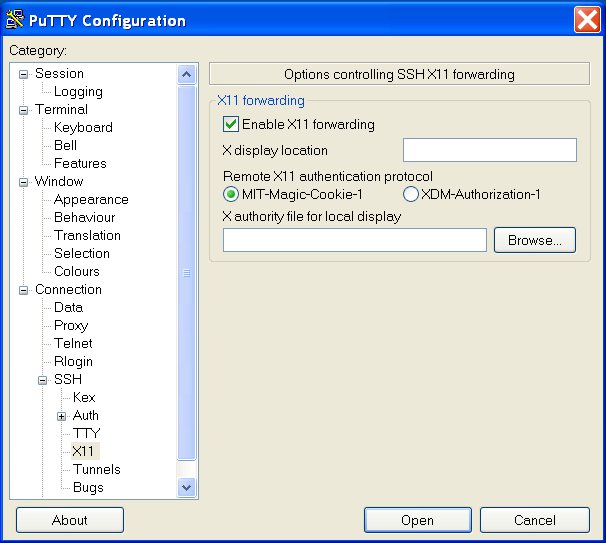
It's pretty well known that ssh can be used to tunnel X11 sessions, typically from a server to your local workstation.  This is extremely handy if you need to run an X program on a remote system on which you only have terminal/shell access.  If you're a windows user, I recommend using Putty, and you can enable X11 forwarding very simply.

From the initial putty menu, note the options on the left, and expand the + next to 'SSH', under the 'Connection' category:


On the next page, you should tick the 'Enable X11 forwarding' tick box:


As soon as you log into the server, you should see a message saying that a new authority file has been created:


This has now set a magic cookie (no really) to authorise the server you have just logged into.  If you're wondering what you've just authorised - you've just authorised the server to send X windows back through the ssl session to display on your computer.  Naturally, you need an Xwin server such as Cygwin-X running on your system.

If everything is working correctly, your session should have an environment variable (DISPLAY) set to something very similar to localhost:10.0, and if you run /usr/openwin/bin/xclock, it should appear magically on your desktop:


While all of this is really great and helpful in the extreme, it is covered in many places and isn't new.  What I recently worked out, and want to share, is the solution to the following two problems:


Having logged in to a system, and set up your X11 tunneling, you lose your X11 tunnel if you:


1) su to another user
2) ssh to a new system


Both of these are dead handy things to be able to do.  If you have to assume root privileges, for example, to run the command that generates an X session, you'll hit problem 1.  If you need to switch to a user on a different system, because you don't have a direct connection to that server, you'll hit problem 2.


1 - How to maintain your X11 tunnel while su-ing to a new user


a) log in to your system as described above
b) check your environment DISPLAY variable:


-bash-3.00$ echo $DISPLAY
localhost:10.0


c) Discover what your session magic cookie is:


-bash-3.00$ /usr/openwin/bin/xauth list
hostname/unix:10  MIT-MAGIC-COOKIE-1  fca50d4504788a86d4b680f3eda4628e


d) su to new user:

-bash-3.00$ su -
Password:

e) set your DISPLAY variable:


root@hostname # DISPLAY=localhost:10.0
root@hostname # export DISPLAY

f) set your magic cookie:
-bash-3.00$ /usr/openwin/bin/xauth add hostname/unix:10  MIT-MAGIC-COOKIE-1  fca50d4504788a86d4b680f3eda4628e


Congratulations - you should now be authorised again to send X11 commands to your local machine.


2 - How to maintain your X11 tunnel while ssh-ing to a new system

This is really easy - either of the following ssh commands works.

ssh -o "ForwardX11 yes" username@remotesystem

or

ssh -X -A username@remotesystem

Monday, 1 August 2011

Very slow log in to Solaris Server

Error keywords seen:  None - just exceptionally slow login

Operating System: Solaris variants

Software: default ssh daemon

Keywords:  solaris stop suppress reverse dns lookup ssh

I've googled many times to find the answer to this one, and read through many man pages.

It's very easy to discover that slow log ins are almost always due to sshd trying to do an nslookup on the login client.  This is a perfectly reasonable security measure, but if the lookup fails it can take a while to timeout, giving the impression that the login is very slow.  In Linux, you change sshd_config and add 'UseDNS no' - this I found recommended many times.

In Solaris, the answer is just as easy, though harder to find:

Add the following line to /etc/ssh/sshd_config:

LookupClientHostnames=no
Restart sshd:

svcadm restart ssh

Check that ssh is running okay - do this before you log out:
svcs -l ssh

If sshd is in maintenance mode, revert your changes and restart ssh:

svcadm clear ssh

Check your change for a typo, and debug as usual.

You should now be able to log in much faster.

Sunday, 10 April 2011

Solaris/OpenIndiana NFS server to Ubuntu NFS host - 4294967294 problem

Error keywords seen:  User and Group set to 4294967294 instead of UID/GID expected

Operating System: Open Indiana oi_148 (Solaris) and Ubuntu 11.04 (Natty Narwhal)

Software: NFS v4


When mounting an nfs shared directory from an OpenIndiana home server, the directory ownership was set to 4294967294:4294967294, despite the ownership on the server being 1000:1000, and the equivalent UID / GID being set up on the client machine.


The solution is to edit the config file /etc/default/nfs-common - the two lines required are:


NEED_STATD="no"
NEED_IDMAPD="yes"


This is enough to change the reported ownership from 4294967294 to 'nobody:nogroup' - which is progress, of a sort.


Our next requirement is to make sure that the nfs client and the nfs server are both using the same domain name.  On the client, change /etc/idmapd.conf so that the domain parameter is correct - in my case, 'homenetwork'.

Domain = homenetwork

Secondly, on the server, make sure that the domainname is correctly set.  As this is running a Solaris(-based) OS, it's very easy - just create or edit the contents of /etc/defaultdomain so that it contains (nothing more than) the correct domain:

homenetwork

And you're done - reboot both sides for luck, and everything should now appear as you expect.

Monday, 7 March 2011

Configure a lofs (LOopback virtual FileSystem) shared area between zones

Operating System: Solaris 10 & variants

Create area to be shared on global zone, e.g. /share

mkdir /share

Configure the zones to use the shared area:

# zonecfg -z zone1
zonecfg:zone1> add fs
zonecfg:zone1> set dir=/share
zonecfg:zone1> set special=/share/sharex
zonecfg:zone1> set type=lofs
zonecfg:zone1> end
zonecfg:zone1> verify
zonecfg:zone1> commit
zonecfg:zone1> exit
# zonecfg -z zone2
zonecfg:zone2> add fs
zonecfg:zone2> set dir=/share
zonecfg:zone2> set special=/share/sharex
zonecfg:zone2> set type=lofs
zonecfg:zone2> end
zonecfg:zone2> verify
zonecfg:zone2> commit
zonecfg:zone2> exit
#

Reboot both zones

# zoneadm -z zone1 reboot
# zoneadm -z zone2 reboot

The filesystems will now be available and fully writeable for both zones.  There is no limit to the number of zones that can share the filesystem.

Thursday, 10 February 2011

Perl: how to inherit and modify the constructor of parent class

This reminder post will be by example, but basically talks about how to inherit a constructor from a parent class, then modify it slightly.  It's also a good case for remembering the reason for this blog - which is to serve as assistance to my memory, and isn't in any way a guidebook or even set of suggestions for how to do things.  This is particularly true of my forays into perl hackery.

Right then.  For this example, we'll start with two simple classes, "Parent" and "Child".  The inheritance relationship works exactly as you'd expect from the names:


Code for inheritance1.pl

#!/usr/bin/perl -w

use strict;

#--------------------------------

package Parent;
sub new {
    my $class=shift;
    my $string1=shift;
    print("1) Called $class constructor with: " . $string1 . "\n");
    my $self={
        string1 => $string1,
        };
    bless($self, $class);
    return $self;
    }

1;

#--------------------------------

package Child;
our @ISA='Parent';
sub new {
    my $class=shift;
    my $string1=shift;
    my $self=Parent->new($string1);
    print("2) Called $class constructor with: " . $string1 . "\n");
    bless($self,$class);
    return $self;
    }

1;

#--------------------------------


my $testObject1=Parent->new("Parent's String");
my $testObject2=Child->new("Child's String");

print("Parent object has stored: ",$testObject1->{string1},"\n");
print("Child object has stored: ",$testObject2->{string1},"\n");

exit 0;


This produces the output:
1) Called Parent constructor with: Parent's String
1) Called Parent constructor with: Child's String
2) Called Child constructor with: Child's String
Parent object has stored: Parent's String
Child object has stored: Child's String


The line of interest here is:
    my $self=Parent->new($string1);

Here the constructor for Child inherits the properties of the constructor for Parent.  As a result, whenever we call the constructor for Child, we see that code from the parent constructor is run.  Additional code from the Child constructor is also run.  However we've really done nothing useful here, as we haven't added any great extra feature to the Child constructor.  So what if we want to store a new parameter into our new object?


Code for inheritance2.pl

#!/usr/bin/perl -w

use strict;

#--------------------------------

package Parent;
sub new {
    my $class=shift;
    my $string1=shift;
    print("1) Called $class constructor with: " . $string1 . "\n");
    my $self={
        string1 => $string1,
        };
    bless($self, $class);
    return $self;
    }

1;

#--------------------------------

package Child;
our @ISA='Parent';
sub new {
    my $class=shift;
    my $string1=shift;
    my $string2=shift;
    my $self=Parent->new($string1);
    print("2) Called $class constructor with: " . $string2 . "\n");
    $self={
        string2 => $string2,
        };
    bless($self,$class);
    return $self;
    }

1;

#--------------------------------


my $testObject1=Parent->new("Parent's String");
my $testObject2=Child->new("Child's 1st String","Child's 2nd String");

print("Parent object has stored: ",$testObject1->{string1},"\n");
print("Child object has stored: ",$testObject2->{string1},"\n");
print("Child object has stored: ",$testObject2->{string2},"\n");

exit 0;


This produces the output:
1) Called Parent constructor with: Parent's String
1) Called Parent constructor with: Child's 1st String
2) Called Child constructor with: Child's 2nd String
Parent object has stored: Parent's String
Use of uninitialized value in print at ./inheritance2.pl line 47.
Child object has stored:
Child object has stored: Child's 2nd String


That didn't work at all!  That shouldn't be too much of a surprise, really, as we've overwritten the declaration of the $self hash.  We could expand it to include everything that the Parent class has, and in this case, it wouldn't take a lot of extra typing, but it's hardly making use of our Object Oriented design, and if there was lots of exciting configuration defined by the $self declaration, we'd lose it all, or have to recreate it.  Better is:


Code for inheritance3.pl
#!/usr/bin/perl -w

use strict;

#--------------------------------

package Parent;
sub new {
    my $class=shift;
    my $string1=shift;
    print("1) Called $class constructor with: " . $string1 . "\n");
    my $self={
        string1 => $string1,
        };
    bless($self, $class);
    return $self;
    }

1;

#--------------------------------

package Child;
our @ISA='Parent';
sub new {
    my $class=shift;
    my $string1=shift;
    my $string2=shift;
    my $self=Parent->new($string1);
    $self->{string2} = $string2;
    print("2) Called $class constructor with: " . $string2 . "\n");
    bless($self,$class);
    return $self;
    }

1;

#--------------------------------


my $testObject1=Parent->new("Parent's String");
my $testObject2=Child->new("Child's 1st String","Child's 2nd String");

print("Parent object has stored: ",$testObject1->{string1},"\n");
print("Child object has stored: ",$testObject2->{string1},"\n");
print("Child object has stored: ",$testObject2->{string2},"\n");

exit 0;


This produces the output:
1) Called Parent constructor with: Parent's String
1) Called Parent constructor with: Child's 1st String
2) Called Child constructor with: Child's 2nd String
Parent object has stored: Parent's String
Child object has stored: Child's 1st String
Child object has stored: Child's 2nd String


And that's just as we expect.